A new set of Android code samples, covering Android Wear, Android for Work, NFC and Screen capturing, have been committed to our Google Samples repository on GitHub. Here’s a summary of the new code samples:
This sample mimics a real world mobile and Android Wear app. It has a more refined design and also provides a practical example of how a mobile app would interact and communicate with its Wear counterpart.
The app itself is modeled after a hypothetical tourist attractions experience that notifies the user when they are in close proximity to notable points of interest. In parallel,the Wear component shows tourist attraction images and summary information, and provides quick actions for nearby tourist attractions in a GridViewPager UI component.
DeviceOwner - A Device Owner is a specialized type of device administrator that can control device security and configuration. This sample uses the DevicePolicyManager to demonstrate how to use device owner features, including configuring global settings (e.g.automatic time and time-zone) and setting the default launcher.
NfcProvisioning - This sample demonstrates how to use NFC to provision a device with a device owner. This sample sets up the peer device with the DeviceOwner sample by default. You can rewrite the configuration to use any other device owner.
NFC BeamLargeFiles - A demonstration of how to transfer large files via Android Beam on Android 4.1 and above. After the initial handshake over NFC, file transfer will take place over a secondary high-speed communication channel such as Bluetooth or WiFi Direct.
ScreenCapture - The MediaProjection API was added in Android Lollipop and allows you to easily capture screen contents and/or record system audio. The ScreenCapture sample demonstrates how to use the API to capture device screen in real time and show it on a SurfaceView.
As an additional bonus, the Santa Tracker Android app, including three games, two watch-faces and other goodies, was also recently open sourced and is now available on GitHub.
As with all the Android samples, you can also easily access these new additions in Android Studio using the built in Import Samples feature and they’re also available through our Samples Browser.
Check out a sample today to help you with your development!
Uniforms variables in GLSL are crucial for passing data between the game code on the CPU and the shader program on the graphics card. Unfortunately, up until the availability of OpenGL ES 3.1, using uniforms required some preparation which made the workflow slightly more complicated and wasted time during loading.
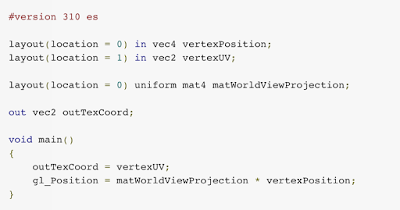
Let us examine a simple vertex shader and see how OpenGL ES 3.1 allows us to improve it:
#version 300 es
layout(location = 0) in vec4 vertexPosition; layout(location = 1) in vec2 vertexUV;
Note: You might be familiar with this shader from a previous Game Performance article on Layout Qualifiers. Find it here.
We have a single uniform for our world view projection matrix:
uniform mat4 matWorldViewProjection;
The inefficiency appears when you want to assign the uniform value.
You need to use glUniformMatrix4fv or glUniform4f to set the uniform’s value but you also need the handle for the uniform’s location in the program. To get the handle you must call glGetUniformLocation.
GLuint program; // the shader program float matWorldViewProject[16]; // 4x4 matrix as float array
That pattern leads to having to call glGetUniformLocation for each uniform in every shader and keeping the handles or worse, calling glGetUniformLocation every frame.
Warning! Never call glGetUniformLocation every frame! Not only is it bad practice but it is slow and bad for your game’s performance. Always call it during initialization and save it somewhere in your code for use in the render loop.
This process is inefficient, it requires you to do more work and costs precious time and performance.
Also take into consideration that you might have multiple shaders with the same uniforms. It would be much better if your code was deterministic and the shader language allowed you to explicitly set the locations of your uniforms so you don’t need to query and manage access handles. This is now possible with Explicit Uniform Locations.
You can set the location for uniforms directly in the shader’s code. They are declared like this
This change is extremely simple and the improvements can be substantial, producing cleaner code, asset pipeline and improved performance. Be sure to make these changes If you are targeting OpenGL ES 3.1 or creating multiple APKs to support a wide range of devices.
To learn more about Explicit Uniform Locations check out the OpenGL wiki page for it which contains valuable information on different layouts and how arrays are represented.
Looking for a free fighting game to maybe while away a few minutes or hours of your time? May we suggest “EA Sports UFC”, if you are of the fighting gaming persuasion. You can act as your favorite UFC fighters and even play against them as well in the only authentic in-ring mobile game which can bring you all the UFC mobile action you'd want.
The game features an almost full roster of UFC fighters superstars including Jon Jones’ spinning back elbow, to Georges St-Pierre’s superman punch, each athlete boasts a unique set of special moves. While it takes the best part of them, it offers something new in the form of touch. It's not tapping and holding the entire fight, it feels like your playing a UFC fighter and does it really well for mobile.
EA Sports UFC is great and plays well also. You'll like how much EA is giving away to the player for free. Yes, you can purchase fighters for real world money, but you don't have to. The fighters you collect randomly from silver currency packs will keep you progressing just fine. It's refreshing to see EA eschew the current standard of locking gameplay to energy, you can grind out as many fights as you want at whenever time.
Here's a quick look at the features of the game: • Feel the fight • Train your ultimate fighter • Play live events, earn exclusive rewards • Fight your way to glory
If you’re interested in this fighting game, you can pick it up at the Google Play Store, free to play with IAPs for in-game currency. You can also download EA Sports UFC APK file (see source link below).
لعبة زوما من الالعاب التي يحبها الكثير من محبي وعشاق العاب زوما وهي لعبة مميزة وينتظر منها الكثير المغامرات والتحديات الرائعة والجميلة في اللعبة المميزة اليوم تستطيع بكل سهولة تحميل لعبة زوما الرائعة لانها من افضل واجمل الالعاب الرائعة والجميلة وهي لعبة مجانية تستطيع تحميلها ولعبها في افضل صورة للعبة واجمل لعبة زوما الرائعة حمل اللعبة الان واستمتع بافضل واجمل الالعاب الرائعة والجميلة في اللعبة المميزة والرائعة والتي ابهرت الكثير من محبي وعشاق العاب زوما الرائعة .
المتابعة
يمكنكم متابعة الموقع وجديد الالعاب من خلال الضغط علي زر اعجاب
عن اللعبة
لعبة زوما السحرية التي نتحدث عنها الان هي من افضل الالعاب الرائعة وهي لعبة حديثة جدا وتستطيع ان تقوم بلعب اللعبة الجميلة والمميزة من خلال الموقع المتخصص في مجال الالعاب والمتخصص ايضا في تحميل العاب وهي لعبة مميزة وتحميلها بسيط ولا يأخذ منك وقت كثير سوف تجد في اللعبة الجميلة والمميزة انها لها وجة اخر من الالعاب الجميلة والرائعة والتي تحدث للكثير من محبي العاب زوما وهي مغامرات زوما الممتعة سوف تجد ان شكل اللعبة له تغيرات كثيرة ورائعة في اللعبة لانها منافضل الالعاب الرائعة التي سوف تراها في لعبة زوما الجميلة والمميزة نذكر بطريقة اللعبة انه يجب عليك ان تقوم بضرب الكرات الملونة بعضها ببعض وان تقوم بالدفاع عن بيت زوما من تسلل الكرات داخل البيت ليست بجديدة تلك المعلومة ولكن اود ان اذكر فقط اللعبة جميلة جدا وتستحق اللعب والمتابعة لانها من افضل واجمل الالعاب الرائعة والمميزة في لعبة زوما الشيقة والرائعة والان مع صور اللعبة لكي نستطيع ان نتعرف عليها جيدا في اللعبة المميزة والرائعة .
صور اللعبة
وبعد ان تعرفنا علي اللعبة الرائعة والجميلة لعبة زوما من خلال صور اللعبة الرائعة يمكنكم الان تحميل اللعبة بطريقة رائعة جدا وسهلة من موقع تحميل وتنزيل العاب وهي اللعبة الجميلة والمميزة والرائعة
You may have heard the phrase ‘the best code is no code.’ While we don’t recommend not writing any code at all, the code you do write should be adding unique value to your app rather than replicating common boilerplate code. The Android Support Library is one of the best resources for accomplishing this by taking care of the little things for you.
The latest release of the Android Support Library is no different, adding a number of extremely helpful components and changes across the Support V4, AppCompat, Leanback, RecyclerView, Palette, and Renderscript libraries. From the new AppCompatActivity and AppCompatDialog to a new guided step flow for Android TV, there’s a lot to get excited about in this release.
Support V4
The Support V4 library serves as the base of much of the Android Support Library and contains many of the classes focused on making backward compatibility much easier.
In addition, we’re making some of the internals of Palette available to all via the ColorUtils class, giving you pre-built tools to better work with colors. ColorUtils makes it easy to calculate the contrast ratio between colors, determine the minimum alpha value to maintain a minimum contrast (perfect for ensuring readable text), or convert colors to their HSL components.
Interpolators are an important part of any animation system, controlling the rate of change in an animation (say accelerating, decelerating, etc). A number of interpolators were added in Lollipop to android.R.interpolator including fast_out_linear_in, fast_out_slow_in, and linear_out_slow_in: important parts of building authentic motion. These are now available via the Support Library via the FastOutLinearInInterpolator, FastOutSlowInInterpolator, and LinearOutSlowInInterpolator classes, making it possible to use these via code for all animations. In addition to those pre-built interpolators, we’ve also created PathInterpolatorCompat, allowing you to build quadratic and cubic Bezier curves as well.
This release also moves the Space widget from the GridLayout library into Support V4, making it available without requiring a separate dependency. The Space widget is a lightweight, invisible View that can be used to create gaps between components.
AppCompat
The AppCompat Support Library started with humble, but important beginnings: a single consistent Action Bar for all API 7 and higher devices. In revision 21, it took on new responsibility: bringing material color palette, widget tinting, Toolbar support, and more to all API 7+ devices. With that, the name ActionBarActivity didn’t really cover the full scope of what it really did.
In this release, ActionBarActivity has been deprecated in favor of the new AppCompatActivity. However, this wasn’t just a rename. In fact, the internal logic of AppCompat is now available via AppCompatDelegate - a class you can include in any Activity, hook up the appropriate lifecycle methods, and get the same consistent theming, color tinting, and more without requiring you to use AppCompatActivity (although that remains the easiest way to get started).
With the help of the new AppCompatDelegate, we’ve also added support for consistent, material design dialogs via the AppCompatDialog class. If you’ve used AlertDialog before, you’ll be happy to know there is also now a Support Library version in support.v7.app.AlertDialog, giving you the same API as well as all the benefits of AppCompatDialog.
The ability to tint widgets automatically when using AppCompat is incredibly helpful in keeping strong branding and consistency throughout your app. This is done automatically when inflating layouts - replacing Button with AppCompatButton, TextView with AppCompatTextView, etc. to ensure that each could support tinting. In this release, those tint aware widgets are now publicly available, allowing you to keep tinting support even if you need to subclass one of the supported widgets.
The full list of tint aware widgets at this time is:
AppCompatAutoCompleteTextView
AppCompatButton
AppCompatCheckBox
AppCompatCheckedTextView
AppCompatEditText
AppCompatMultiAutoCompleteTextView
AppCompatRadioButton
AppCompatRatingBar
AppCompatSpinner
AppCompatTextView
Lollipop added the ability to overwrite the theme at a view by view level by using the android:theme XML attribute - incredibly useful for things such as dark action bars on light activities. Now, AppCompat allows you to use android:theme for Toolbars (deprecating the app:theme used previously) and, even better, brings android:theme support to all views on API 11+ devices.
If you’re just getting started with AppCompat, check out how easy it is to get started and bring a consistent design to all of your users:
Leanback
With the Leanback library serving as the collection of best practices for Android TV apps, we’d be remiss to not make an even better 10’ experience as part of the release with the new guided step functionality.
This set of classes and themes can be used to build a multiple step process that looks great on Android TV. It is constructed from a guidance view on the left and a list of actions on the right. Each is customizable via themes with a parent of Theme.Leanback.GuidedStep or, if even more customization is needed, through custom a GuidanceStylist and GuidedActionsStylist.
You’ll also find a large number of bug fixes, performance improvements, and an extra coat of polish throughout the library - all with the goal of making the Leanback experience even better for users and developers alike.
RecyclerView
Besides a healthy set of bug fixes, this release adds a new SortedList data structure. This collection makes it easy to maintain a sorted list of custom objects, correctly dispatching change events as the data changes through to RecyclerView.Adapter: maintaining the item added/deleted/moved/changed animations provided by RecyclerView.
In addition, SortedList also supports batching changes together, dispatching just a single set of operations to the Adapter, ensuring the best user experience when a large number of items change simultaneously.
Palette
If you’ve been using Palette to extract colors from images, you’ll be happy to know that it is now 6-8 times faster without sacrificing quality!
Palette now uses a Builder pattern for instantiation. Rather than directly calling Palette.generate(Bitmap) or their equivalents, you’ll use Palette.from(Bitmap) to retrieve a Palette.Builder. You can then optionally change the maximum number of colors to generate and set the maximum size of the image to run Palette against before calling generate() or generateAsync() to retrieve the color Swatches.
Renderscript
Renderscript gives you massive compute potential and the Support Library version makes a number of the pre-defined scripts, called script intrinsics, available to all API 8+ devices. This release improves reliability and performance across all devices with an improved detection algorithm in determining whether the native Renderscript functionality can be used - ensuring the fastest, most reliable implementation is always chosen. Two additional intrinsics are also added in this release: ScriptIntrinsicHistogram and ScriptIntrinsicResize, rounding out the collection to ten.
SDK available now!
There’s no better time to get started with the Android Support Library. You can get started developing today by downloading the Android Support Library and Android Support Repository from the Android SDK Manager.
To learn more about the Android Support Library and the APIs available to you through it, visit the Support Library section on the Android Developer site.
For Jelly Button Games, understanding users is the key to creating and maintaining a successful game, particularly when growth relies on moving into overseas markets. The team makes extensive use of Google Analytics and Google BigQuery to analyze more than 3 billion events each month. By using this data, Jelly Button can pinpoint exactly where, when, and why people play their highly-rated game, Pirate Kings. Feeding this information back into development has driven active daily users up 1500 percent in just five months.
We caught up with Mor Shani, Moti Novo, and Ron Rejwan — some of the co-founders — in Tel Aviv, Israel, to discover how they created an international hit and keep it growing.
Learn about Google Analytics and taking your game to an international audience:
Analyze — discover the power of data from the Google Play Developer Console and Google Analytics.
Query — find out how Google BigQuery can help you extract the essential information you need from millions or billions of data points.
Localize — guide the localization of your app with best practices and tools.
اليكم اليوم اللعبة الرائعة والجميلة والتي نالت اعجاب الكثير من محبي وعشاق العاب الحرب والقتال والاكشن لعبة البطل المقاتل اللعبة التي نالت اعجاب الكثير من محبي وعشاق الالعاب الرائعة يمكنكم الان تحميل لعبة تحميل لعبة البطل المقاتل Patih Araya بسهولة من موقعنا الرائع والجميل موقع تحميل العاب مجانا الموقع الذي نال اعجاب الكثير من محبي وعشاق تحميل الالعاب الرائعة والجميلة يجب عليك اتباع خطوات تحميل اللعبة لكي تقوم بالتحميل الصحيح واللائق باللعبة الجميلة والرائعة حمل اللعبة الان واستمتع بكل ما فيها من اكشن ومغامرات وقتال وحرب ارجوا الاستمتاع باللعبة الرائعة والجميلة الان .
المتابعة
يمكنكم متابعة الموقع وجديد الالعاب من خلال الضغط علي زر اعجاب
عن اللعبة
تتحدث اللعبة عن بطل همام يعيش في مدينة هادئة واهلها يحبون تلك البطل وفي ذات يوم من الايام جائت مجموعة شرسة الي المدينة لكي تنهب ثرواتها وتحتلها واصبح الناس في زعر وخوف من تلك الاشخاص الذين جاءو الي المدينة فأصبحو لا يعلمون كيف يعملون في تلك المصيبة التي حلت بهم فقررو ان يتخذو منهم بطلا يقوم بمحاربة وقتال الاعداء في المدينة ولكن قالو من سوف يكون هذا البطل ولكنهم تيقنو انك ان البطل نعم انت البطل الذي سوف تقوم بمحابة الاعداء وتحرير المدينة من الاعداء الذين جاءو لينهبو ثرواتها العب اللعبة وحارب الاعداء وحرر المدنية من الاشرار وقاتلهم قبل ان ينالوا منك انت الامل الاخير لاهل المدينة الذين ينتظرونفوزك علي الاعداء اللعبة جميلة جدا وتستحق اللعب والمتابعة ويمكنكم الان تحميل اللعبة الجميلة من موقع العاب لتحميل الالعاب فان الموقع متخصص في تحميل كافة الالعاب الرائعة والجميلة ويمكنكم الان تحميل اللعبة منه بسهولة ويسر الان سوف اعرض عليكم صورا للعبة لكي تتعرفو عليها اكثر قبل لعبها .
صور اللعبة
وبعد ان تعرفنا علي اللعبة من خلال الصور يمكننا الان ان نقوم بتحميل اللعبة الجميلة الرائعة من موقع تحميل العاب مجانا